On this page
How to play Click Speed Test
Press the pad as fast as you can until the time runs out. Your first press starts the clock, and it counts. Choose 1, 5, 10, 30 or 60 seconds first. The Daily is fixed at 10.
What counts
| Input | How to start | Counted |
|---|---|---|
| Mouse | Click the pad | The main button, when it goes down |
| Touch or pen | Tap the pad | Each finger landing |
| Space | Click Use Space or Tab to the pad | A fresh key press, not a held key repeating |
- One input per run. Your first press sets it. Other inputs are dropped, and the result says how many.
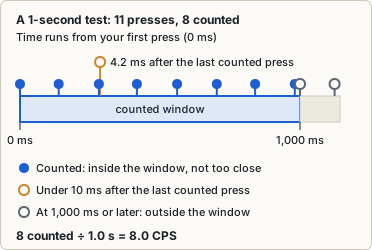
- The window. Your first press, at t0, opens a window as long as the test. A press counts if its browser timestamp is at or after t0 and before t0 plus the length.
- The 10 ms rule. A press less than 10 ms after the last counted one is dropped. Exactly 10 ms counts.
- Coarse clocks. If your browser rounds its timestamps to steps of 4, 16.67 or 100 ms, the result says “Coarse timer”. The 10 ms rule and the Unranked checks are then off for that run.
- Freezes. Presses queued during a brief page freeze are still counted by their timestamps (tests).
- Leaving. Hiding the tab or clicking into another window cancels the run. In Free play, Esc or Reset does too.
How CPS is worked out
CPS is counted presses divided by the test length in seconds, written out as 6.4 CPS = 64 clicks ÷ 10.0 s. It stays unrounded and shows to one decimal. From 5 s up, the card adds Peak (the most counted presses in any 1-second span) and Second half (second-half presses against the first half, in percent).
Tempo names
A ranked result is titled with a tempo name. Each press counts as a sixteenth note, so BPM is CPS × 15. The boundaries are our own table, and a boundary value takes the higher name (7.2 is Allegro).
| Name | From CPS |
|---|---|
| Largo | 0 |
| Adagio | 4.0 |
| Andante | 4.8 |
| Moderato | 6.0 |
| Allegro | 7.2 |
| Vivace | 9.2 |
| Presto | 11.2 |
| Prestissimo | 13.6 |
Tips and strategy
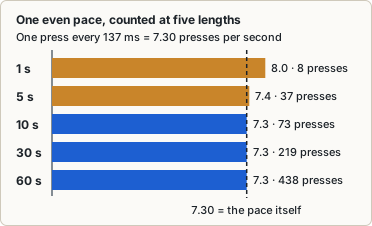
- Short tests read high. The first press counts, so a count can sit up to one click above speed × time: up to 1.0 CPS at 1 s, 0.1 at 10 s. Compare your bests only at the same length and input.
- Run to the end. The tempo name uses your whole-run average. Second half shows whether you slowed.
- Pause when time is up. The pad ignores presses for at least 1.2 s after the end, and until you have stopped for 0.6 s. The next press then starts a new run and counts as its first.
Our numbers
These numbers come from the game’s own checks, not from visitors. How we test covers the method.
Counting checks, 29 October 2026
- Human-like presses: 10,000 generated 10-second runs at 4.0 to 14.0 CPS, with each gap varying by a standard deviation of 8% to 15% of the average. Unranked: 0. In 1,000 runs with two fingers taking turns, also 0.
- Machine-like presses: 1,000 runs each at 8 CPS with 0, ±0.5 and ±1 ms of jitter. Unranked: 3,000 of 3,000.
- Rounded clocks: 2,000 runs with times rounded to 16.67 or 100 ms. Unranked: 0 (the result says “Coarse timer”).
- Freezes: scripted presses with set timestamps. A 200 ms freeze across the deadline: the 41 expected presses were counted, for mouse and touch.
- Long run: a scripted 60 s run at 20 presses a second on a busy test machine. Counted: 1,200 of 1,200.
Limits. These are generated and scripted presses, not real players or physical phones. Jitter was tested only up to ±1 ms, so a tool that varies its timing like a hand isn’t caught.
Daily puzzle and records
The Daily is a 10-second test with any input. It has no puzzle, so the rule is the same on each date. The day changes at midnight on your device’s clock, and Daily #1 was 1 November 2026. For what the games’ Dailies have in common, see the Daily page.
- Three tries. A try is used on its first press, and an interrupted try is used up. A first touch that turns into a page scroll is given back (checked in an emulated touch browser, not on a real phone).
- Result. Your best ranked try counts. With none ranked, the last shows as Unranked with no score. Use best now ends the Daily early.
- Recorded once. The first finished Daily of a date is the record. Replay as practice leaves it and your streak alone. An Unranked Daily counts as played and keeps the streak, but sets no Best.
- Best per length. The game keeps one for each length and input, 15 in all. Only ranked Free play and Daily runs update it; practice and Unranked runs don’t. The Best on the result card is your play record, which practice leaves alone too.
- Share line.
6.4 CPS · Moderato · ▅▅▅▄▄▄▄▄▄▅, thenMouse · 10 s. Each block is a tenth of the run: ▁ is under 1.75 CPS, each step adds 1.75, and █ is 12.25 or more.
Frequently asked questions
Why is my CPS higher on 1 second than on 10?
The first press counts, so a short window gets a bigger boost: up to 1.0 CPS at 1 s against 0.1 at 10 s. Slowing down also pulls a longer average down.
Why weren’t some of my presses counted?
They used a different input than your first press, came less than 10 ms after the last counted press, were a held Space repeating, fell off the pad or outside the window, or used a non-main mouse button. The result counts the first two.
What does Unranked mean?
With at least 15 gaps between counted presses, either their standard deviation was under 2 ms or at least 80% sat within 1 ms of the median gap. Or more than 25% of your presses came less than 10 ms after the one before. You keep your CPS, but get no tempo name, Best or Daily score. These checks are off when the result says Coarse timer.
Does the spacebar count the same way?
Yes: same window, 10 ms rule and Unranked checks, except on a run that says Coarse timer. Focus the pad first, with Use Space or Tab. Space has its own Best.
Do two-finger, jitter or drag clicks count?
The game has no technique setting. The presses your browser reports go through the same rules: one under 10 ms after the last counted press is dropped, and the run is Unranked if more than 25% of presses are dropped that way. Both are off when the result says Coarse timer. Compare your results only with runs on the same device and input method.
Why does 4.0 CPS say Largo?
Tempo names use the unrounded CPS, and the card shows one decimal. 119 clicks in 30 s is 3.967 CPS: it shows 4.0 and is Largo. 120 clicks is exactly 4.0 and is Adagio.
Last updated: November 2, 2026.