On this page
- Rules, the first-click rule and board sizes, from Beginner 9×9 with 10 mines to Expert 30×16 with 99
- Touch, mouse and keyboard controls, and how to chord
- Tips for reading numbers, with a 1-2-1 figure
- Checks we ran on the boards, with dates and counts
- The Daily Minefield, its three strikes and your records
How to play Minesweeper
Minesweeper hides mines under a grid of covered tiles. Your job is to open the tiles that hold no mine. The numbers tell you where the mines are not.
The rules
- Numbers: an opened tile shows how many of its 8 neighbors hold a mine.
- Empty tiles: a tile with no mine around it shows no number. It opens its neighbors for you, and the spread stops at numbered tiles.
- Flags: a flag marks a tile you think holds a mine. A flagged tile can’t be dug, and the spread skips it.
- Mines left: the counter shows mines minus flags. It goes below zero if you place too many flags.
- Win or lose: you win when only mines are still covered. Dig a mine and you lose. The Daily gives you three strikes instead.
- Clock: it starts at your first dig. It stops when you finish, and while the page is hidden. Flags only work after that first dig.
Board types and sizes
| Board | Size | Mines | Mine share | Safe tiles to open |
|---|---|---|---|---|
| Beginner | 9 × 9 | 10 | 12.3% | 71 |
| Intermediate | 16 × 16 | 40 | 15.6% | 216 |
| Expert | 30 × 16 | 99 | 20.6% | 381 |
| Custom | 5–30 wide, 5–24 tall | 1 up to 35% of the tiles (251 on 30 × 24) | up to 35% | tiles minus mines |
| Daily Minefield | 16 × 16 | 40 | 15.6% | 216 |
Beginner, Intermediate and Expert each come as Classic or No-guess. The buttons marked NG are the No-guess boards. Custom boards are Classic only.
Your first click
- Classic boards: the board is built after your first dig. That tile and its 8 neighbors hold no mines, so your first dig opens an area. Start anywhere. Classic boards are random and not checked for solvability, so a forced guess can still come up.
- No-guess boards: the game rings a start tile, at least two tiles in from the edges. It has no mines around it, and only that tile can be dug first. From there, logic alone can clear the board. We check that before you see it (Our numbers).
Controls
| Action | Touch | Mouse | Keyboard |
|---|---|---|---|
| Dig | Tap with Dig on, or hold with Flag on | Left-click | Enter or D |
| Flag or unflag | Tap with Flag on, or hold with Dig on | Right-click | F |
| Chord a number | Tap or hold the number | Left-click it, middle-click it, or press both buttons | Space, Enter or D on the number |
| Switch what a tap does | Dig and Flag buttons under the board | Same buttons | – |
| Move the cursor | – | – | Arrow keys, Shift for 5 tiles |
| New game | New button | New button | N or F2 |
| Tile size | Settings | Settings | + for Large, - or 0 for Fit |
Space also flags a covered tile. Press Tab to focus the board. A screen reader announces each tile you land on, such as “Row 3, column 5, covered”.
A chord opens the covered, unflagged neighbors of a number in one click. It needs the flags around the number to match the number. A wrong flag means you dig a mine: a loss in Free play, a strike on the Daily. If the counts differ, nothing opens.
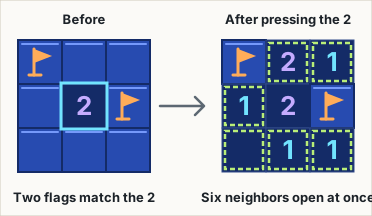
On a touch screen:
- Your finger picks the tile. The tile is the one you touch first, not the one under your finger when you lift.
- Holding does the opposite action. After 120 ms a magnifier appears above your finger on tiles under 28 px, with the target outlined. At 300 ms the hold fires, before you lift. In Settings, Hold to flag can be Fast (200 ms), Normal (300 ms) or Relaxed (450 ms).
- Slide away to cancel. Move 10 px or more and nothing happens. If the board is bigger than its frame, it scrolls instead. A second finger also cancels.
- Expert turns upright. On a tall screen the 30 × 16 board is drawn 16 columns wide and 30 rows tall. It is the same board, with the same records.
Tap the board-size label above the board to open Settings. It also holds Tile size (Fit or Large, at least 26 px), Left-click chords (on by default) and Vibrate.
Tips and strategy
- Take the sure things first. A 1 with one covered neighbor means that neighbor is a mine. A number that already has that many flags means its other neighbors are safe, so chord it.
- Compare two numbers. Say a 1 sees two covered tiles, and the 2 beside it sees those two plus one more. The extra tile is a mine, because the 2 holds one more mine than the 1.
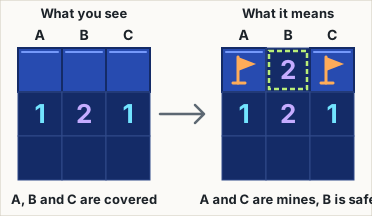
- Learn the 1-2-1. Three covered tiles above a 1, a 2 and a 1 along a straight edge are mine, safe, mine, as long as those numbers touch no other covered tile. The figure shows why.
- Lean on the Daily’s recipe. A Daily board is built so that single-number moves and two-number comparisons are enough, and at least one comparison is needed. If you stall, look for a pair of neighboring numbers.
- Chord, but check the flags first. Chords save clicks. In Free play a wrong flag turns one into a loss (“A flag was wrong.”), and on the Daily it costs a strike. Flags are optional: a win without placing any shows “No flags” in your result, but chords need flags.
- Use the counter late. When your flags are right, the counter is the number of hidden mines left. If it equals the number of covered, unflagged tiles, those tiles are mines. If it reads 0, they are safe.
- After a Daily strike, slow down. A strike adds 15 seconds, and the third ends the run. The struck mine stays on the board and counts as a flag for chords and for the counter, so use it.
Our numbers
These counts come from our own boards and tests, not from player data. The method is on How we test.
Generator checks, run on 25 October 2026
- Daily boards: 3,650 days in a row, from 1 November 2026 to 28 October 2036. A board was found for each day, using at most 31 tries (the limit is 400). A separate checker solved 3,650 of 3,650 from the ringed tile. The generator’s own solver made 0 wrong deductions, and no board repeats within 365 days.
- No-guess boards: 10,000 each of Beginner, Intermediate and Expert. The checker solved 10,000 of 10,000 in each size, with 0 wrong deductions.
Rule tests, run on 25 October 2026
- First click: 100,000 Classic boards across the three standard sizes. On each, the first tile and its 8 neighbors had no mines, and the mine count was exact.
- 3BV: 10,000 random boards, 5–30 wide and 5–24 tall. Our count matched a second, independent method on each board.
- Checker against brute force: 400 small positions. The checker found exactly the tiles that trying each mine layout proved safe or mined.
Daily range. A Daily board must pass four tests before you see it: single-number moves and two-number comparisons clear it, at least one two-number comparison is needed, the first opening spans 12 to 70 tiles, and the 3BV falls between 52 and 81. The 3,650-day run above found 0 failures.
Tile sizes, measured on 25 October 2026. On the Daily’s 16 × 16 board, tiles measured about 18 px on a 320 px wide phone and 22.3 px at 390 px. Expert turned upright measured about 19 px at 390 px (25 October 2026), and 28 px on a desktop.
We do not check Classic boards for solvability, so we publish no figure for how often they need a guess.
Daily puzzle and records
The Daily Minefield is a 16 × 16 No-guess board with 40 mines and a ringed start tile. Everyone whose device shows the same calendar date gets the same board. A new one starts at midnight on your device’s clock.
- Three strikes: the first two mines you hit don’t end the run. Each becomes a defused mine and adds 15 seconds. The third hit ends it. Three dots beside the Daily label show the strikes you have left.
- What is recorded: your first finished Daily of the date, win or loss. A win records your time, penalty seconds included, as your Best if it is the fastest, and extends your streak. A loss counts as played, sets no Best and resets the streak. Its result shows the share of 3BV you cleared, such as “72% cleared”.
- Share picture: a dial built from the timing, kind and size of your moves. It draws no tile or mine positions, so it can’t spoil the board for someone who hasn’t played yet.
After your first result, Replay as practice lets you play the board again without changing your records. The Daily page covers what the games have in common.
In Free play, each size has its own Played, Win % and Best, and Classic and No-guess are kept apart. Custom boards count toward Played and Win % but have no Best time. Records and saved boards stay in this browser.
Frequently asked questions
Is the first click safe in Minesweeper?
On the three standard Classic boards (Beginner, Intermediate and Expert), yes. The board is built after your first dig, with no mines on that tile or the 8 around it. We tested this on 100,000 boards across those sizes on 25 October 2026. On No-guess boards you dig the ringed tile first, and it has no mines around it either.
What is a No-guess board, and why is there a ringed tile?
It is a board you can clear by logic alone, from the ringed tile. Logic needs a starting point, so that tile is where it begins. Digging or flagging elsewhere first does nothing. On 25 October 2026 a separate checker solved 10,000 of 10,000 No-guess boards in each size.
How do I flag on a phone?
Press the Flag button under the board, then tap tiles. Or stay in Dig mode and hold a tile for 300 ms. A ring fills around your finger, and the flag lands at that moment, before you lift. You can change the hold time in Settings.
What do 3BV, 3BV/s and efficiency mean?
3BV is the fewest clicks that would clear the board if you knew where the mines were, with no flags or chords. It counts one click per opening, plus one for each safe tile no opening reaches. 3BV/s is 3BV divided by your time in seconds. Efficiency is 3BV divided by your clicks, as a percentage. Clicks include digs, flags, chords and presses that did nothing, so a chord can lift efficiency above 100.
Is the Daily Minefield the same for everyone?
Yes, for everyone on the same calendar date. The date comes from your device’s clock, so two people in different time zones can be on different days for part of the day.
What does “Was it a guess?” mean after a loss?
After a loss in Free play, the result may show one line. “That tile was a certain mine” means the numbers already proved it. “A certain safe tile existed elsewhere” means a provably safe move was available. “No safe move was certain — that was a forced guess” means no tile could be proved safe. We judge from the numbers visible just before your dig and the total mine count, not from your flags. If the check takes longer than 150 ms, no line appears. After a losing chord it says “A flag was wrong.” instead. The Daily does not show any of these.
Does quitting a game count as a loss?
No. Starting a new game or changing the board size leaves the old game unrecorded. After 20 seconds of play, the game asks first. If you close the page instead, the board is saved and you pick up where you left off.
Last updated: November 1, 2026.